Showing posts with label hitboxes. Show all posts

Saturday, 28 February 2026

An Arrow To The Knee But Then I Raised The Aimpoint


 I used to be an adventurer like you, but then - whizzzzzz ack! Since this video there is a cool motion trail effect courtesy of a ribbon particle behind each arrow as it cuts through the air.

So archery has been somewhat missing as I have been concentrating on devising an animation led melee combat system. This now work rather nicely (except when it inexplicable doesn't play the prepAttack animation and I have to throw in a safety call to get it back on track) so it was time to get on to ranged weaponry.

Cue Clannad and the greatest decade in history, the 1980s.


 Now, because I've upended the whole stock animation system, it turns out that mouse aiming system no longer works, because who wants mouse aiming to override a melee based animation system? Well no one, so that will take a bit of looking into to fix. However the actual aiming and shooting works, even if the AI and client Player doesn't currently animate correctly to look like it, due to the removal of most of the blend animation code.

I have a variety of ranged weapons coded, both differing sizes of bows and crossbows, with bows requiring greater stats in both STRength and DEXterity for use which make them much more expensive in XP spend to use, but having hugely quicker reloading than crossbows. 

Projectile damage is based on a singular strike to the target's hitboxes, so whilst a heavy melee attack can cause damage to multiple hitboxes with a wide slashing motion, arrows cause damage based on range to target to simulate increased velocity from loosing up close and the archer's ability to pinpoint weak areas in the target's defences. Getting struck at maximum range whilst wearing a full harness is most likely to plink off, but getting shot up close with 300lb of draw weight is another matter.

The main level has had a bit of a revamp, with more trees and shrubs in the open side of the map, but there is still plenty of nice open space for longbows to wreak havoc. 

I also converted my AiPlayer routines to use the new stock engine AiController system, which can be attached to any playable class including those usually restricted to clients, to turn them into Ai controlled - hence the new classname. This class has a lot of dynamic avoidance and automatic repathing systems, but even without those I found it to be very heavy on processing. Whilst still useful for being able to control the usual client based objects, it's clearly something to be used sparingly, and to keep the standard Ai based classes to themselves.

Archery is pretty much the final part of the Ai warbands and battle system, and with it now functioning materially (if not animating aiming perfectly) I need to integrate it's use into the AiPlayer combat routines. The most obvious example is for a warband that outranges an opponent is for them to stop, hold fast, and pepper the enemy at distance whilst they themselves seek to move to attack.

Whilst this is all in the works, here's a video of meeting engagement between the Norse and the Magyars, the latter of whom will be one of the more heavy ranged weaponry factions in the future.


 Aside from fitting archery into the individual AiPlayers' combat routine, I need to come up with a method of allowing the player to use archery effectively, regardless of their third person rotatable camera system. The obvious cop-out here would be to follow Elden Ring's lead and switch to first person for aiming. Maybe I can come up with something else which retains the third person view ... ?

Speaking of the player, to be honest they haven't really got a lot to do at the moment, as all my efforts have centered around making the AiPlayer's work as cohesive raiding parties, so next up after I tackle the blended aiming animations, is to give the actual client player something to play.

It's February, and it's ending early, somebody stole 2 extra days that I could have been coding! 

Sunday, 30 June 2024

Melee Working Redux


Last Month's Blender Animations Are This Month's Game Animations

I cleaned up my dev folder system, mostly because it had no particular system at all, and was just a mess of folders dumped into a single directory. Over the years this had grown to a somewhat considerable number of test builds, most of which were pointless duplications. Tidy all of this up into a few folders based on simple concepts such as "Game Builds", "Test Builds", "Modules", etc has made everything a lot easier to find.

The only casualty to all of this was the deletion of my Melee Build Test Area, which I had thought was just another test area, however it included some more up to date melee code than the named Melee Project. However it was not particularly advanced so came as no great loss, and whilst redoing the now deleted extra pieces, I actually improved them.

I imported my previously rotoscoped animations into the game engine, and set up a character to use them. With a bit of tinkering all worked as intended, though I have since edited the standard run animation as it contained quite a sharp hip flick which in turn sent the character's butt cheeks into rather a frenzy. This has since been toned down.

Next up was to reinstate hitBoxes to the character limbs. Unfortunately some of the bones rotations had developed a nasty roll , which sent the hitBoxes for the legs into a strange position and so I proceeded to fix this, and annoyingly all the animations which I had previously made had to be redone. Thankfully it was only the legs which needed retuning.

From Hell's Heart I Give You A Good Pokey-Pokey!

HitBox testing worked well, and I even changed the code as to how strikes work. When I had first written the melee code last year, I had for some reason had great trouble trying to get a box mounted on the weapon to use as a strikeBox against the target's hitBoxes, and had in the end settled for an armature bone system to measure between the bones for the length of the attack. 

I say "for some reason" because it all seemed quite straightforward now to set up a box on the weapon for collision, get it's measurement and offset from the handle/mounting point. So the hacky bone node system was retired in favour of the collision box size and offset being automatically stored on datablock preloading. And if there is no box to provide collision for the weapon, it will fallback to using the bounds box and work out it's offset from the mountPoint. So, not sure why all of this proved hugely difficult last year, but I expect "tunnel vision" which seems to happen quite a bit in game development.

The Cold Steel! They Don't Like It Up 'Em!

Expanding the original melee code, which already had a fatigue and rage system, I added stagger depending on how much damage the target had taken versus how much they had remaining. Stagger breaks the target's attack and defence, potentially leaving them open for a free strike. The lower the target's HP, the more they will stagger.

It took a bit of trial and error to prevent the code getting stuck in certain animations, but after a while I ironed out all the obvious bugs. I also rewrote how falling damage works, introducing a plummet system were the player just drops face first, and if damage on impact is high enough a custom plummetDeathAnim plays.

Elden Ring Style Stat Bar Reduction

The player Stat Bars on the GUI got an overhaul, when health or energy is lost the original level is now shown as a different colour and reduces until it meets the current Stat level, a bit like it does in Elden Ring (no I haven't played it, but I am aware it is a thing, and a thing with Stat Bars which do this).

The weapon FSM system got a whole overhaul, and light and heavy attacks now trigger in a way which does not require the player loop to count, freeing up a couple of write/read stream vars. A quick released attack button sets the FSM to interrupt the state and send a light attack var, whilst holding it allows the state to complete for a heavy attack.

There was probably a lot more "stuff" that got done, but I can't remember it all off the top of my head here.


Flaming June was more damp squib June for the second year running, and the strawberry patch appears to have already given up the ghost.

It's halfway through the year already which only goes to show how painfully slow game development is. 😩

Wednesday, 31 May 2023

Boxes In Boxes


According to the weather forecast, she will need a jumper ...

After getting mild sun burn sat out by the veg patch with a bottle of wine, we are now back to standard British weather of needing a jumper for late Spring and early Summer ... Flaming June looks like it means that the fireplace will need to be lit ...

Steam brought out an update to the Steamworks SDK, sneaking it out again as they did in the previous month without any fanfair. Once again they had made changes to the authentication system, and once again I had to wade through code comments to find out what it all meant - except this time I also had to wade through the online documentation, complete with it's links to various 404 dead pages. To quote the docs at https://partner.steamgames.com/doc/webapi/ISteamUserAuth:

 NOTE: This call requires a publisher API key to use this method. As such this API MUST be called from a secure server, and can never be used directly by clients!

So, yeah I'm good, this was just splitting up web-based games from the standard Steam Client authentication. Also feel free to click the api.steamworks link at the bottom of that page for more helpful advice. 😉

In April I had attempted to create a melee combat system of checking through a defending player object's hitBoxes for intersection with an attacking object's hitBox - to see if this would be faster than using a raycast system of quad edges projected from the attacker's weapon - all whilst suffering from the Dreaded Lurgy.

What I found, during illness enduced brain fog, was that there was no current system to determine whether rotated worldSpace boxes intersected (OOB) only AABB. Now without the brain fog I had another attempt at coding a solution to this, with a nice easy early out if half longest box sides added together were beyond central distance, though ended up using raycasts after all for the actual connection checks, which were oriented in worldSpace with the attacker's box and then a perpendicular test if no initial result was found.

The end result was that I found checking through the defender's 12 hitBoxes (but potentially up to 20) could easily take more than the standard 4 raycasts which I had been previously using. On top of that, box intersection would take more the boxes behind the initial hit into account, nearly doubling the struck areas, so a big melee swing would 98 damage rather than 40 something. To order these results in worldSpace would require another raycast or more maths based on location and orientation.

tl;dr - I've kept my original melee system, it works fine for what I want, but I might use the OOB intersection for weapon on weapon parrying.

So, that was the month that was. Flaming June awaits, with a promise of thick jumpers and hot cocoa ... 😒

Sunday, 30 April 2023

The Dreaded Lurgy


The Dreaded Lurgy is a Rare SWAG Power-up. It is an Attack Based event which causes the targeted MONSTER to succumb to the Dreaded Lurgy. The infected MONSTER is highly contagious and will transmit the Dreaded Lurgy to any other MONSTER who they come into contact with. However, after receiving the dark gift of the Dreaded Lurgy, the victim is now immune from further infection.

Annoyingly this is also a thing in real life, and I have spent the last month suffering from The Langshan-Po Lurgy - a free internet to anyone who gets the reference, but Gen-X (greatest generation) here, is probably just showing his age.

Needless to say 3D vector maths, gimbals, quaternions, cpp and general cerebral activity, has been somewhat compromised with lurgy brain fog. In celebration at the cerebral degradation - which hopefully will only be temperory - I have revised, both the icon and the in-game activation event art, for
The Dreaded Lurgy.

However during this time, Steam has snuck out a new update to Steamworks (v1.56) ... which broke previous coded SteamGameServer::getAuthentication - thank you Valve devs for the code comments which gave a good explaination of the new changes. 

The Steam update for Monsters Loot Swag is here.

It has also spent all month raining again - just like last month. So it turned out in the end there really was enough rain for April showers. In the midst of all these downpours there has been a frequent visitor, and pidgeon numbers are being reduced.

Who's a pretty boy, then?

In the world of melee combat coding I decided to try a new way of doing things and ended up on some terrible code carousel, going round and round in circles - and having the Dreaded Lurgy did not help brain function. 

I had wanted to look down a list of the target's hitboxes and check if they were within the bounds of a weapon's hitbox. This caused far more problems than I had preceived, with a total lack of being able to get the transforms and orientation of the hitbox meshes within the model. When I could get the hitbox mesh itself it wouldn't allow me to translate it to into world space because it was the wrong class, when I had world space I could not access the hitbox mesh because that was then the wrong class.

I could test a strike against the target bounds and check for intersecting but then to get the actual hitboxes still required using a raycast against all hitboxes to get their transforms and then suddenly we were into more load than I had before.

Dave is made of hitboxes and the raycast is checking alignment of the forearm hitbox

 The only thing I can think of is to create a whole series of points within each of the target's hitboxes and and then check the Box3F of the weapon hitbox against all these points --- and once again we are into even more load, and not the less I was hoping for with just intersection checks of boxes.

Giving all of this up as a bad job, I decided to use the 4 main edges of the weapon hitbox and fire a raycast down each length for more accuracy than a single, central raycast check. This has turned out to be infinitely simpler than going down a list of up to 20 hitboxes checking for intersections.

I also coded up a fatigue system for heavy attacks, sprinting and swimming, and completely rewrote how fall damage works. I started to add attribute statistics for the player, which are fairly similiar to standard RPG stuff with STR, DEX, CON, etc, and the start of a leveling and experience system.

Next up will be to code classes and jobs with bonuses for these attributes on how fast experience points boost them.

Next month I am not certain whether I will continue with the melee action RPG prototype or start porting Monsters Loot Swag to the newest an shiniest version of the engine - I expect it will be a bit of both.

The Dreaded Lurgy is finally subsiding and I am down to a dry and somewhat sore throat with an occaisional dry cough. A pox upon the ... er ... pox!

Monday, 30 November 2020

Damageable Areas And Wonky Maths

 I had been coding an external camera. Move it horizontally and it would extend out and wrap around so you could view all the way from the front. Vertical worked in the same manner except it stopped directly above or below so the whole scene didn't appear upside down. Then I merged the two together and everything kind of broke. In retrospect this probably due to me fixating over the Y value of the movement  of the camera whilst ignoring both the mvoement distance and actual camera rotation. This appears to have led it to wander off when both x and y values exceed 0.5f.


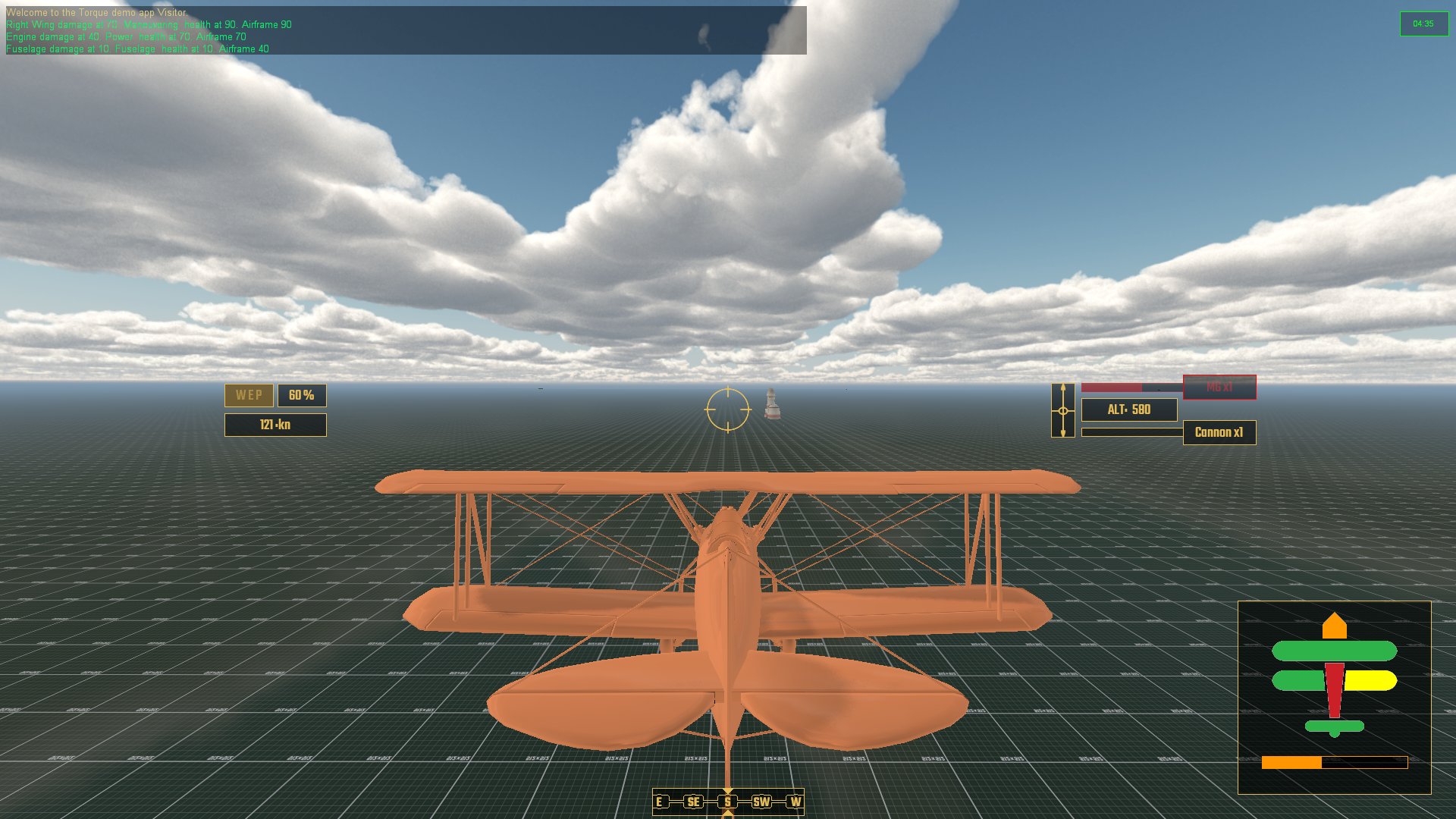
Having previously coded a hitbox solution for individual areas of the airframe, I had tied all of that together with damageable modifiers for how perfromance of the aircraft would deteriorate. Damaged wings reduce maneuverability, damaged engine losses speed and acceleration, etc, etc. I added a HUD element so that the player could visually see the state of the aircraft with a total airframe health bar for overall damage.

Aircraft systems on the lower right, radar to go lower left

There was a minor conundrum with weapons and their placement on the model. I was considering adding extra variables to weaponImage code so that a gun could fire from up to 3 seperate points from an aircraft with their own particle emitters and fx. In the end I simply added a gun to each of the relevant aresa and had them synchronize to fire alternatively.

Guns go brrrrrr ... and in order

I started to figure out AI and which tasks they should be concentrating on in some sort of order of importance. At the top of all of these is not stalling because falling out of the sky due to making a dumb maneuver at low speed would be considered bad and also rather embarrassing. I'm developing a skill system for AI pilots where lower skill will mean being more reactive and higher skills more proactive. This can be used for simple and obvious things like taking an aiming line ahead of a moving target, to how to respond to and evade an attacker, turning from the role of defender to aggressor, such as pulling up, rolling and reducing speed all together to get the opponent to fly past - and so we are back to not stalling.

Speaking of stalling, I have been contemplating adding a high-G turn or stall turn maneauver, where rapidly losing speed when decelerating boosts maneuverability - with the ever present danger of pushing it too far and stalling.

So next up, code some basic AI that can be able to perform a basic Combat Air Patrol, move to a location and circle that area, do some basic dogfighting with an opponent and the such like. Also need to code a radar. I have a few code examples from this, including the 3D style radar from Elite, but think that I will probably stick with a top-down type like Ace Combat 7.